
Updated for 2026
SEO for Bounce House Rental Websites — Get Found When Parents Search
Keywords, FAQ sections, title tags, image alt text, JSON-LD, and Google Search Console — plus the RentalSetup tools that make bounce house SEO practical.
Updated: · Originally published:
Table of Contents
Why Bounce House SEO Matters in 2026
If you run a bounce house or party rental business and your calendar has empty weekends, the problem is often visibility — not your equipment. Parents search Google for “bounce house rental near me,” “rent a water slide,” or “birthday party bounce house.” If your site doesn’t match those queries with clear, helpful pages, the booking goes to whoever already ranks.
Search Engine Optimization (SEO) is how you increase the odds that Google shows your site for those searches. You don’t need to be a marketer. You need product pages that say you rent (not sell), answer sizing and delivery questions, use the right titles and images, and get measured in Google Search Console so you know what’s working.
This 2026 guide walks through customer search language, how to write better SEO content with tools inside RentalSetup, how to add FAQ sections that can win featured snippets, structured data (JSON-LD), local off-page signals, and a practical checklist you can use on every product page.
Match Real Searches
Write for “rent a bounce house,” not “buy commercial inflatables.”
FAQ Sections
Answer size, weather, and delivery questions — earn snippet potential.
Built-in SEO Tools
Title tags, alt text, service areas, and GSC-friendly pages in RentalSetup.
Build an SEO-ready bounce house website — free to start.
Start Building FreeUnderstanding Your Customer’s Searches
The first step in SEO is understanding what potential customers type when they need party equipment. Google tries to match those queries to the most relevant websites. Your job is to create content that answers those searches directly.
Examples of customer search queries:
- “Rent a bounce house”
- “Rent a bounce house near me”
- “Birthday party for 6 year old”
- “Water slide rental [your city]”
- “Moon bounce rental for backyard”
Common mistake
Many new party rental sites write a short product blurb and forget the word rent. Google then can’t tell if you’re a seller of commercial inflatables or a local rental company. Always make the rental intent obvious in titles, headings, and the first paragraph.
Renting vs. selling — it matters for SEO
A seller’s site uses phrases like “buy a commercial bounce house” or “good investment for your fleet.” As a rental business, your content should cover the rental process, delivery and setup, which events the unit is good for, age ranges, yard size, and the keyword rent. That helps Google show you to people who want a weekend party — not operators shopping for inventory.
📍 Put your city or service area in titles and first paragraphs: “Bounce house rental in [City] — delivery & setup included.” Local modifiers are how “near me” searches find you.
How to Write Better for SEO (RentalSetup Tools Walkthrough)
Writing for SEO doesn’t mean stuffing keywords. It means answering the questions a parent has before they book — in language they already use — and filling out the SEO fields so Google can display your page correctly. The video below shows how to write better for SEO and walks through the tools inside RentalSetup that help with titles, descriptions, and on-page optimization.
Watch: writing better SEO content and using RentalSetup’s built-in SEO tools.
After you watch, apply the same habits on every product page: longer helpful copy beats thin one-liners, update pages when you add units or change service areas, and always fill title + meta description before you call a page “done.”
Updating on a consistent basis is a strategy that can meaningfully boost bookings. We cover that in more detail in how to get more bounce house rentals with website updates.
On-Page SEO: Optimizing Your Bounce House Website
On-page SEO is everything you control on your own site. On RentalSetup, you can manage the highest-impact pieces without a developer.
Content is still king
- Write comprehensive content — cover events, capacity, setup space, what’s included, and what makes the unit special. Longer, useful pages often beat thin competitor listings.
- Update frequently — new photos, seasonal promos, and fresh FAQs help you compete with older domains.
- Use “rent” language naturally — in H1s, product names, and body copy.
- Publish articles — a page about how your rentals fit a specific event gives search engines more to match than a product list alone. Create articles on your rental website.
Technical SEO elements inside RentalSetup
Title tags
The title appears in the browser tab and as the blue link on Google. Make it descriptive and include rental keywords. On a product page, edit the title tag in the SEO section of the edit page.
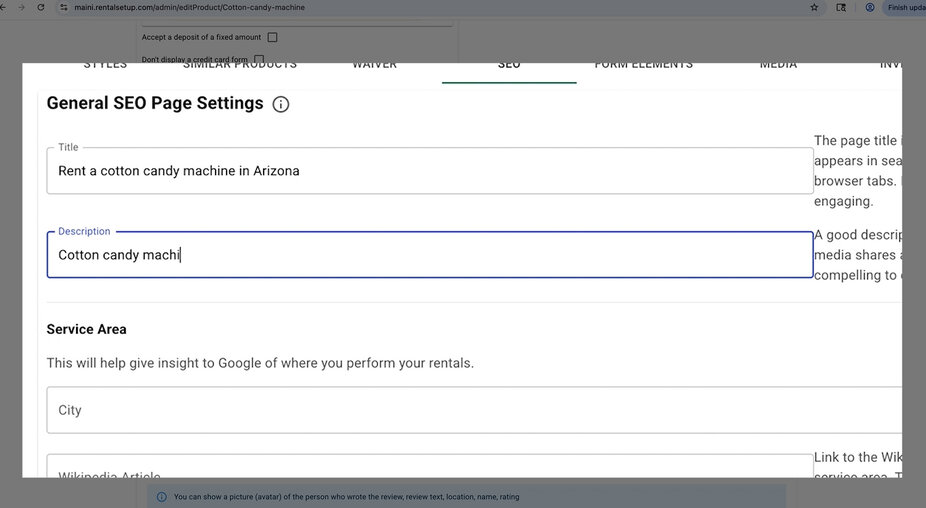
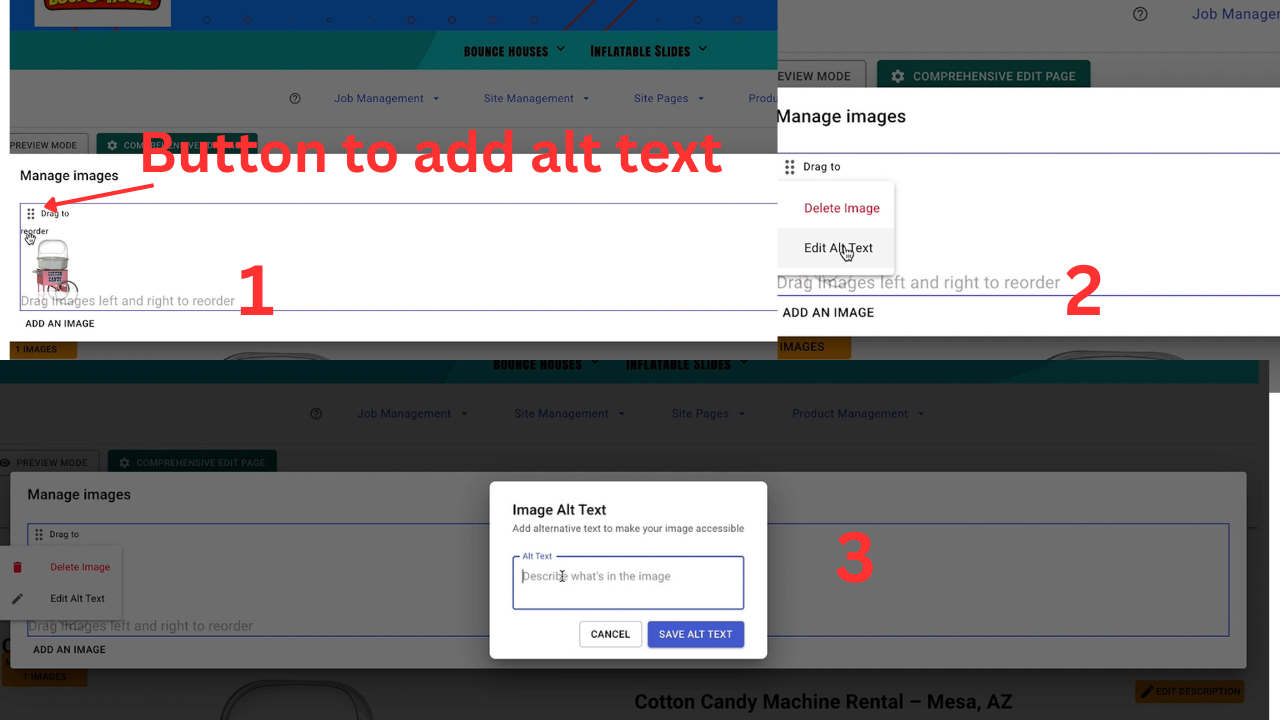
Image alt text
Alt text describes images to search engines and screen readers. It’s another place to use relevant phrases like “blue castle bounce house rental.” In RentalSetup you can add alt text for each image.
Service areas
Clearly define where you deliver. Local signals help you appear when someone searches “near me” or your city name.
Customer reviews
Reviews with strong ratings can make listings stand out in search and build trust before the book button.
Add an FAQ Section to Your Pages
FAQ blocks are one of the highest-ROI SEO upgrades for bounce house sites. Parents ask the same questions every week: How many kids fit? What’s the yard size? Do you deliver? What if it rains? Putting answers on the page helps Google (and reduces your phone time). FAQs are also strong candidates for featured snippets and FAQ rich results.
Watch how to add an FAQ section on your page inside RentalSetup:
Watch: adding an FAQ section to your rental product or homepage.
FAQ ideas for bounce house product pages
- How many kids can use this bounce house at once?
- What size yard do I need?
- Is delivery and setup included?
- What happens if it rains?
- Do you need a power outlet / generator?
- What ages is this unit best for?
❓ Write FAQs in plain language, one clear answer per question. Avoid stuffing every keyword into every answer — Google rewards usefulness.
Add SEO-ready product pages and FAQs — start free on RentalSetup.
Start Building FreeUnderstanding JSON-LD (Structured Data)
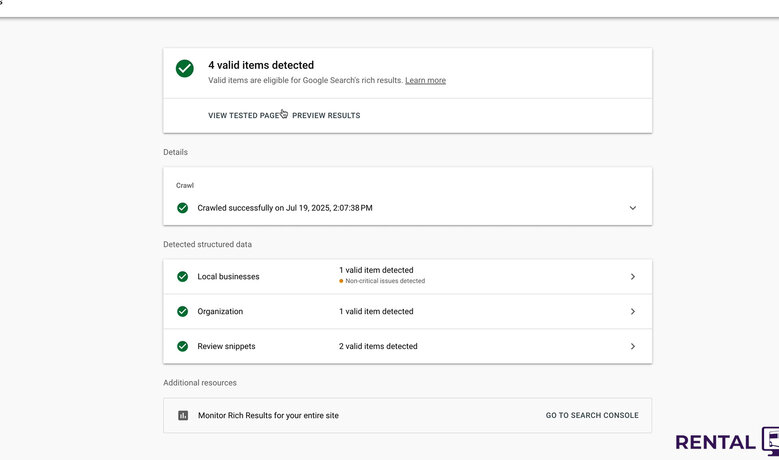
JSON-LD is a structured-data format Google understands well. When you enter title, description, reviews, and business details, a good platform generates JSON-LD so Google can display your content more effectively — for example with richer listings.
Information you can include:
- Title
- Description
- Service area
- Address
Providing a physical address is a strong local signal. Google uses a searcher’s location (IP or GPS) to decide who to show; telling Google where you operate helps connect you with nearby customers.
Test your markup with Google’s Rich Results Test.
Off-Page SEO: Building Local Authority
Off-page SEO is what happens outside your site that still affects rankings.
Google Business Profile
Setting up your Google Business Profile is one of the highest-impact local SEO moves. It tells Google your name, location, hours, photos, and service areas — and often appears in the map pack above organic results. Keep your website URL consistent with your product pages.
Backlinks
Backlinks are links from other sites to yours. A link from a local newspaper, school PTA resource page, or city events directory signals trust. You don’t need hundreds of links — a few relevant local ones help more than spammy directories.
Site age
Older domains often have an advantage. You can’t change your start date, but you can outwork older competitors with better content, more frequent updates, stronger FAQs, and clearer local signals.
Measure Your Success with Google Search Console
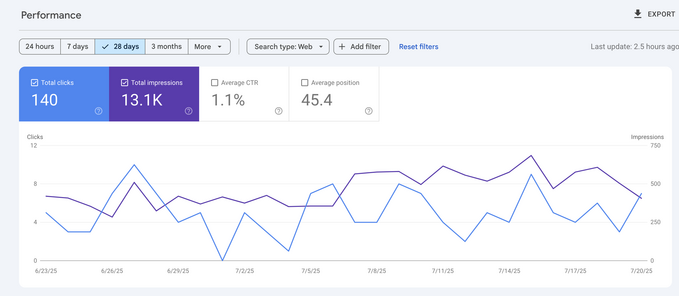
Google Search Console is free and essential. Use it to see:
- The queries people type to find your site
- How often your links appear (impressions)
- Your average position (lower is better — position 1 is the top result)
- Which pages get clicks so you know what to improve next
Beyond Search Console itself, RentalSetup users can check how their bounce house and party rental product pages are ranking with our in house tool for finding out your rankings on Google. It shows search queries and rankings for your product pages so you know which units need better titles, FAQs, or more content — and which ones are already winning clicks.
📊 If a page gets lots of impressions but few clicks, rewrite the title and meta description. If it ranks on page 2, expand the content and add an FAQ — then recheck in a few weeks.
Product Page SEO Checklist
Run this checklist on every bounce house, water slide, and combo page before you share it:
- Use the word “rent” and related keywords naturally
- Write a detailed, unique description (not copied from the manufacturer)
- Fill out the Title Tag and Meta Description in the SEO section
- Add high-quality images with descriptive Alt Text
- Add an FAQ section for size, delivery, weather, and capacity
- Include customer reviews when possible
- Specify service areas for the product
- Test structured data / JSON-LD when you change major SEO fields
FAQs About Bounce House Website SEO
What is SEO for a bounce house rental website?
It’s optimizing your pages so Google shows them when parents search for rentals — keywords, helpful content, titles, alt text, local signals, FAQs, and structured data that make your business easy to understand and book.
Why add an FAQ section?
FAQs answer the questions that block bookings and can earn rich results in Google. They also cut down on repetitive phone calls about size, weather, and delivery.
How do RentalSetup SEO tools help?
You can set title tags, meta descriptions, image alt text, and service areas on product pages — plus write richer descriptions and FAQ sections — without hiring a developer. Watch the SEO tools video above for a walkthrough.
How often should I update my site?
As often as you can reasonably maintain quality. New inventory photos, seasonal offers, and expanded FAQs beat a site that hasn’t changed in two years. Consistency matters more than perfection.
Start Ranking for Bounce House Rentals
Pick one product page today. Improve the title, add alt text, write a real FAQ, and publish. Then connect Google Search Console and watch which queries start to move. SEO compounds — small weekly improvements beat a one-time redesign you never finish.
RentalSetup
The easiest way to build your rental business website. Get started for free.
Legal
Privacy Policy© 2026 RentalSetup. All rights reserved.