
🎟️ Coupon Codes: Get More Party Rental Bookings with Discounts
Create coupon codes for your party rental products with RentalSetup. Offer percentage discounts, run seasonal promotions, and attract more customers to your bounce house and inflatable rental business.
Updated:
Table of Contents
Coupon Codes: Boost Your Party Rental Business
Want to attract more customers to your party rental business? Coupon codes are one of the most effective ways to drive bookings. With RentalSetup, you can create discount codes that take a percentage off your rental prices—making it easy to run promotions, reward loyal customers, or fill up slow weekends.
Whether you're offering a "SUMMER20" code for 20% off bounce houses or a "FIRSTORDER" discount for new customers, coupon codes give you flexible control over your pricing and promotions.
✨ What You Can Do with Coupon Codes:
- Create multiple coupon codes per product
- Set custom percentage discounts (5%, 10%, 20%, etc.)
- Toggle coupons on/off without deleting them
- Track which coupons customers use on orders
- Create site-wide coupons for the checkout page
Ready to boost your bookings with coupon codes?
Start Your Free Website TodayHow to Create Coupon Codes for Your Products
Creating a coupon code in RentalSetup is simple. Go to any product's edit page and scroll down to the Coupon Codes section. Click the "Add Coupon" button, enter your coupon code name (like "SAVE10"), set the discount percentage, and save.
When a customer visits your product page, they'll see a coupon code input field. If they enter a valid code, the discount is automatically applied to their order total. It's that easy!
💡 Pro Tip: Use memorable, easy-to-type coupon codes. "SUMMER20" is better than "XYZ123ABC". Customers are more likely to remember and share simple codes.
Watch this video to see how to create coupon codes in RentalSetup:
Create Multiple Coupons for a Single Product
Need to run multiple promotions at once? RentalSetup lets you create as many coupon codes as you want for each product. This is perfect for:
- Seasonal promotions: "SPRING15", "SUMMER20", "FALL10"
- Customer segments: "FIRSTTIME25", "RETURNING10"
- Partner discounts: "FACEBOOK15", "INSTAGRAM20"
- Event-specific: "BIRTHDAY10", "GRADUATION15"
Each coupon can have a different percentage discount. You can also toggle individual coupons on and off without affecting the others.
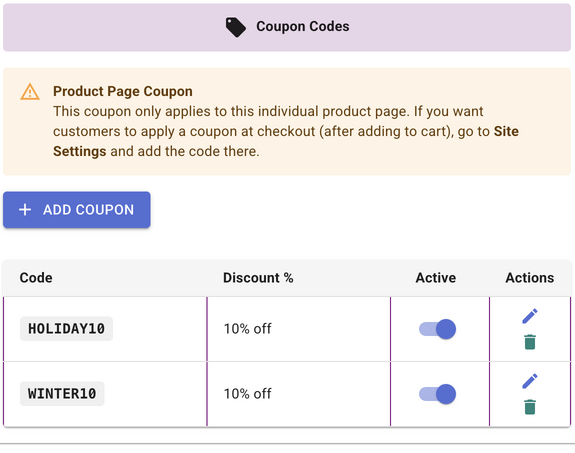
Coupons for the Checkout Page (Cart)
Want to offer a discount that applies to the entire cart, not just one product? You can create checkout page coupons in the Site Settings area.
When customers add multiple rentals to their cart and proceed to checkout, they can enter a coupon code that applies to their entire order. This is perfect for site-wide sales like "20% off all rentals this weekend!"
🏷️ Product Page Coupons
Created on individual product edit pages. Apply only to that specific product. Great for product-specific promotions.
🛒 Checkout Page Coupons
Created in Site Settings. Apply to the entire cart at checkout. Perfect for site-wide sales and promotions.
📍 Where to find it: Go to Site Settings → scroll to Coupon Codes section → Add your checkout page coupons there.
Coupons for Multi-Product Pages
Do you have a multi-product page where customers can rent multiple items at once? You can create coupon codes for these pages too!
Multi-product pages are great for party packages—like a "Birthday Party Bundle" with a bounce house, tables, and chairs. Adding a coupon code to these pages lets you offer package discounts that encourage customers to book more items together.
Creating coupons for multi-product pages works the same way as regular products—just go to the multi-product's edit page and add your coupon codes in the Coupon Codes section.
Learn more about Multi-Product Pages →Toggle Coupon Codes On and Off
Running a limited-time promotion? No need to delete your coupon when it ends. RentalSetup lets you toggle coupon codes on and off with a single click.
When a coupon is toggled off:
- The coupon code input won't appear on the product page
- Customers can't use the code even if they know it
- The coupon stays saved so you can re-enable it anytime
This is perfect for seasonal codes you want to reuse each year, or flash sales that only run for a few hours.
View Coupons Used on Rental Orders
Want to know which coupons your customers are using? RentalSetup shows you this information right on the Jobs admin page.
When a customer places an order using a coupon code, you'll see:
- The coupon code name they entered
- The discount percentage applied
- The amount saved on the order
This helps you track which promotions are driving the most bookings and understand your customers' buying behavior.
See Which Products Have Coupons
Managing coupons across multiple products? The Products list page makes it easy to see at a glance which products have coupon codes set up.
You'll see a quick indicator showing how many coupons are active on each product. Click to expand and see the details—coupon names, percentages, and whether they're currently active or not.
This overview makes it simple to manage promotions across your entire inventory without having to open each product individually.
Best Practices for Party Rental Coupons
1. Use Clear, Memorable Code Names
"SUMMER20" is better than "CODE123". Make it easy for customers to remember and share your coupon codes with friends.
2. Promote Your Coupons
Share your coupon codes on social media, email newsletters, and flyers. A coupon only works if people know about it!
3. Create Urgency
Limited-time coupons create urgency. "This weekend only: Use code FLASH25 for 25% off!" drives faster bookings.
4. Track What Works
Use different codes for different channels (FACEBOOK10, INSTAGRAM15) to see which marketing efforts bring the most bookings.
5. Don't Over-Discount
10-20% discounts are often enough to drive bookings without cutting too deep into your profits. Save bigger discounts for slow periods.
Start Using Coupon Codes Today
Coupon codes are a powerful tool for growing your party rental business. With RentalSetup, you can create, manage, and track coupon codes easily—all included with your website.
Start with a simple promotion like "10% off your first booking" and see how it impacts your rental orders. As you get comfortable, experiment with different discounts, seasonal promotions, and targeted codes for different customer segments.
Ready to boost your party rental bookings?
Build Your Free Website NowCheck out our complete setup documentation to learn more about all the features available for your rental website.
You can checkout our documentation page to see how some of the features from the RentalSetup platform can help you with your rental business.
Checkout our Facebook page for updates and tips.
RentalSetup
The easiest way to build your rental business website. Get started for free.
Legal
Privacy Policy© 2026 RentalSetup. All rights reserved.