
Updated for 2026
Launch your inflatable rental business online in hours — no tech skills needed.
Real-time availability, online bookings, inventory for bounce houses and inflatables, mobile-friendly pages, and full features from $25/mo. Free to start.
Updated: · Originally published:
Table of Contents
Inflatable Rental Business Website Builder: Get Found and Get Booked
If you rent bounce houses, water slides, obstacle courses, or moonwalks, your next customer is probably searching on their phone right now — “inflatable rentals near me,” “bounce house rental,” or “moon bounce rental for a birthday.” Without a dedicated site that shows what’s available and lets them book, those searches go to whoever already looks professional online.
RentalSetup is an inflatable rental business website builder built for this exact niche. You get a public site that showcases your fleet, a booking calendar that respects inventory, and tools to grow through search — without hiring a developer or duct-taping three different apps together.
This guide covers how to create a website for your inflatable rental business, how to grow bookings once you’re live, and why a rental-specific platform beats a generic website builder when Saturdays get busy. Whether you are just buying your first castle or already run a trailer full of slides, the same foundation applies: show what you rent, prove it’s available, and make booking effortless.
Growing an inflatable rental business used to mean flyers, yard signs, and hoping schools called you back. Today the operators who win are the ones who show up in Google for local intent searches and convert that traffic with photos, specs, and a calendar. Your website is not a brochure — it is your storefront that never closes, even while you are on a delivery.
Real-Time Availability
Customers see open dates. You stop double-booking the same bounce house on peak weekends.
Inflatable Inventory
Track bounce houses, slides, and packages so popular units never get overbooked.
Mobile Booking
Parents book from the backyard. Pages and checkout are built for phones first.
Online Payments
Collect deposits or full payment when they book — fewer no-shows.
SEO-Ready Pages
Product pages and articles that can rank for local inflatable rental searches.
Affordable
Start free. Full features including custom domain and cards for $25/mo.
Ready to put your bounce houses and slides online?
Start Building FreeWhy You Need a Dedicated Inflatable Rental Website
Generic website builders (Wix, Squarespace, basic WordPress themes) make pretty pages. They do not understand that your 15×15 castle can only be in one backyard at a time. Without rental inventory and a shared calendar, you end up managing bookings in texts, spreadsheets, and sticky notes — and eventually someone gets a confirmation for a unit that’s already out.
Challenges of generic builders
- No real inventory management — a “contact us” form doesn’t know if the obstacle course is free on Saturday.
- Double-bookings — two families can request the same moon bounce for the same day if nothing locks stock.
- Extra apps and fees — you often add a booking plugin, a payment app, and a calendar tool that still don’t talk to inventory.
- Weak rental SEO structure — product pages lack the booking + specs layout searchers and shoppers expect for inflatable rentals.
Benefits specific to inflatables
Inflatable customers buy with their eyes. They want to know size, theme, capacity, and what setup looks like. A dedicated inflatable site lets you lean into that:
Photo galleries
Show each bounce house from multiple angles — entrance, interior, and set up at a real party. Theme colors and characters sell the “wow” faster than a paragraph.
Sizing charts
Use tables for footprint, height clearance, and how many kids fit. Parents planning a small yard need this before they call.
Video embeds
Short clips of setup or kids using the unit convert better than static photos alone. The block editor supports YouTube, MP4 links, and uploads.
Package options
Bundle a castle + slide + generator package. Clear packages raise average order value without confusing the checkout.
Think about the customer journey. A parent searches “moon bounce rental” on Friday night after their kid asks for a bounce house birthday. They open three tabs. The first site is a Facebook page with no prices. The second is a Wix brochure that says “call for availability.” Yours shows the castle, the size chart, this weekend’s open slots, and a deposit button. Guess who gets the booking — and the review that fuels the next one.
A dedicated inflatable site also protects your brand. When all of your marketing (Google Business Profile, Instagram, yard signs, school flyers) points to one URL with consistent naming and inventory, you look established. When every lead goes to a different inbox or DMs, you look like a side hustle — even if your equipment is better than the competition.
🚀 If your first Saturday of the season is already booked by phone, imagine capturing the rest of the month while you sleep — that’s what online availability + inventory unlocks.
Step-by-Step Guide: Building Your Inflatable Site with RentalSetup
You don’t need design skills. Follow this path and you can go from empty account to live booking page the same day.
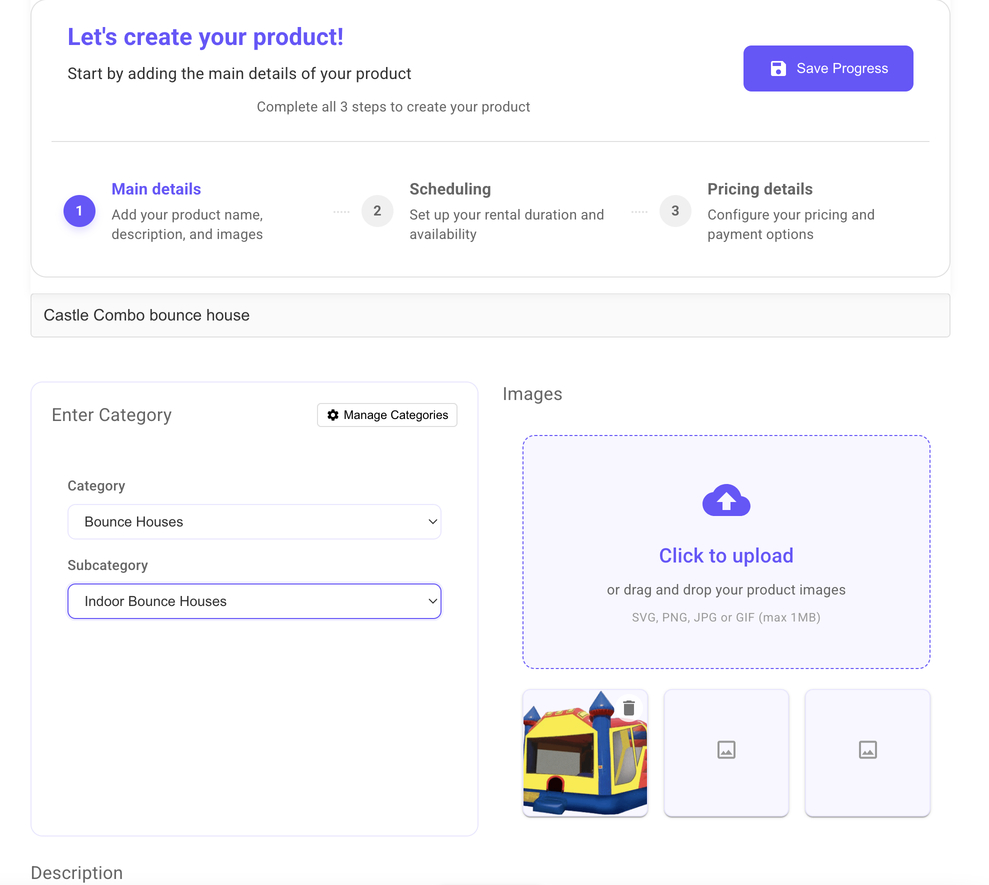
1. Upload your inflatable products
Add each bounce house, water slide, obstacle course, and combo unit as its own product. For every item include:
- Photos — bright outdoor shots plus at least one “in use” photo
- Description — themes, age range, capacity, what’s included (blower, stakes, delivery radius)
- Pricing — day rates, weekend rates, and any add-ons
- Availability rules — so the calendar knows when the unit is free
2. Use the Block Editor for pro product pages
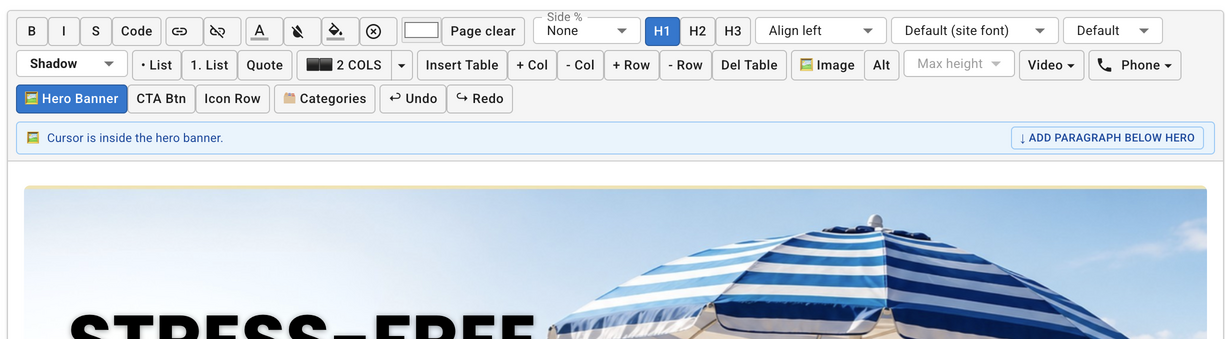
Plain paragraphs don’t sell a $300 weekend rental. Open the Block Editor on a product or homepage and build marketing-quality layouts:
- Hero banners — full-width photo with a headline like “Book the #1 castle in town”
- Videos — setup time-lapse or kids jumping (YouTube, MP4, or upload)
- Two-column layouts — photo beside a “what’s included” list
- Tables — sizing, capacity, and setup area specs
For a deeper walkthrough of every block, see our guide to professional party rental product pages with the new editor.
Short demo: building rich product pages with heroes, columns, and media.
3. Online booking, payments, and coupons
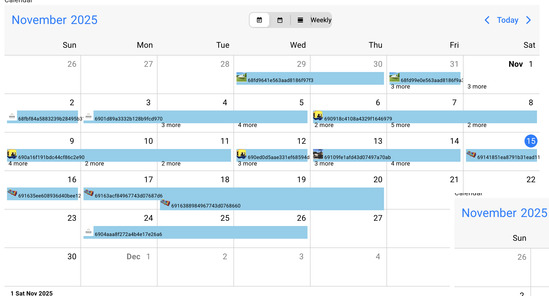
Turn the site into a sales machine: customers pick a date and time on your product pages, see if that inflatable is free, sign a waiver if you require one, and pay a deposit. Add coupons for weekday discounts or “book early for summer” promos to fill slower days. Those bookings then show up on your jobs calendar so you can plan deliveries and avoid double-booking.
4. Publish, share, and iterate
Once your first products are live, put the URL everywhere: Google Business Profile, Instagram bio, email signature, and on the side of your trailer. Ask happy customers for reviews that mention the product name (“We rented the blue water slide”). Then come back weekly to improve weak pages — better photos, a clearer size table, or a short video of setup.
Operators who update their sites during the season consistently get more jobs than those who launch once and forget. Search engines reward freshness, and customers trust a catalog that looks current. When you buy a new obstacle course, add it the same week — don’t wait until next spring.
⚡ Start with your top three sellers. Perfect those product pages first, then expand the catalog. Speed to a live booking link beats a perfect unfinished site.
Build your inflatable rental website free — upgrade when you need payments & a custom domain.
Start Building FreeKey Features for Inflatable Rentals
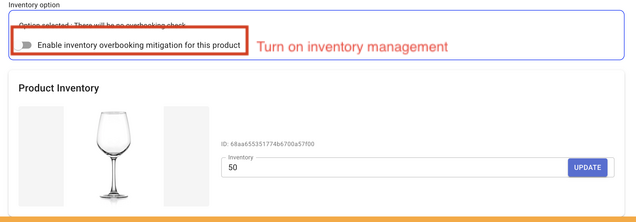
Inventory tracking (stop overbooking popular bounce houses)
Peak season is won by whoever doesn’t mess up Saturday logistics. Inventory tracking ties each product to real availability. When the pink princess castle is booked, it’s gone from that day’s options — so you don’t promise it twice.
SEO tools (including Google Search Console)
Getting found for “inflatable rentals” and “bouncy castle hire” in your city is how you grow without paying for every click. RentalSetup helps you publish SEO-friendly product pages and site content, and supports Google Search Console (GSC) integration so you can see which queries send traffic and fix pages that aren’t ranking yet. You can also use our in house tool for finding out your rankings on Google to see how your bounce house and inflatable product pages are ranking — then improve the ones that need more visibility.
Mobile optimization
Most birthday and school-party research happens on phones. Your product photos, calendar, and checkout need to work with thumbs — not just on a desktop. RentalSetup sites are built mobile-first so parents can reserve while standing in the yard measuring space.
Trust elements (reviews & insurance badges)
New customers ask: Are you insured? Do you deliver? Do other families love you? Use the Icon Row / trust bar on your homepage — Fully Insured, Free Delivery within X miles, 5-Star Reviews — right under a hero photo of your best setup. Add review quotes and insurance badges on product pages so hesitation drops before the book button.
Job management that matches how you work
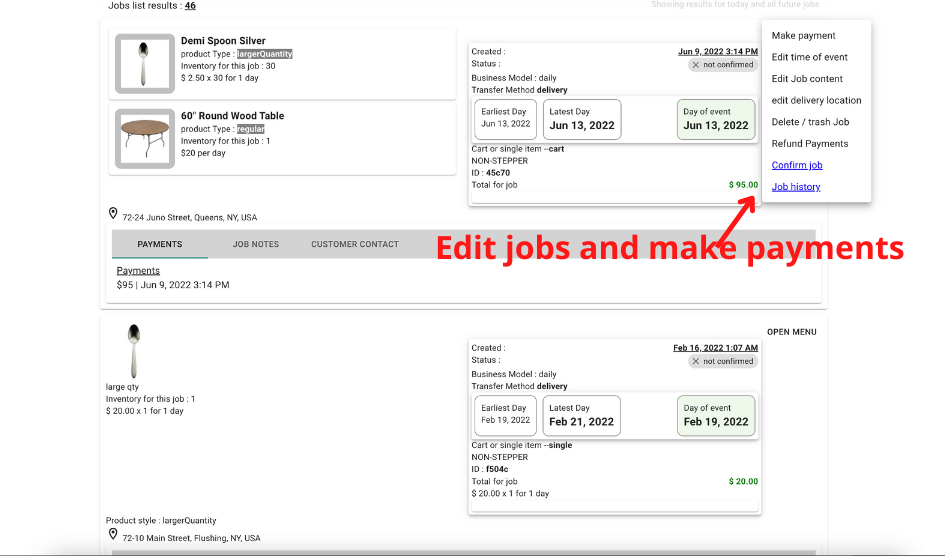
After the booking lands, you still need to deliver, set up, tear down, and clean. A good inflatable business website builder is also your back office: see upcoming jobs, customer contact info, addresses, and which units are assigned. That reduces “which trailer has the blower?” chaos on Saturday mornings and helps you hire helpers with clearer instructions.
Comparison: RentalSetup vs General Builders vs Other Rental Software
Here’s how an inflatable-focused website builder stacks up when you’re choosing how to grow online.
| Feature | RentalSetup | Wix / general builders | Other rental software |
|---|---|---|---|
| Built for inflatable / party rentals | Yes | No | Often yes, higher price |
| Real-time inventory & anti-overbooking | Built-in | Needs apps / custom | Usually yes |
| Online booking + calendar | Built-in | Plugin maze | Built-in |
| Block editor for pro pages | Yes (heroes, video, tables) | Drag-drop only | Varies / limited |
| SEO + GSC-friendly setup | Yes | Basic SEO tools | Varies |
| Payments & coupons | Yes (premium) | Extra apps | Often included |
| Price to start | Free → $25/mo full features | Monthly + app stack | Often $50–$200+/mo |
| Best if you… | Want site + bookings + inventory together | Only need a brochure site | Need enterprise ops, bigger budget |
⚖️ Wix can look great — until Saturday double-bookings and three monthly app subscriptions show up. RentalSetup keeps website + inventory + bookings in one place at a price built for small fleets.
Real Examples & Tips to Grow Your Inflatable Business Online
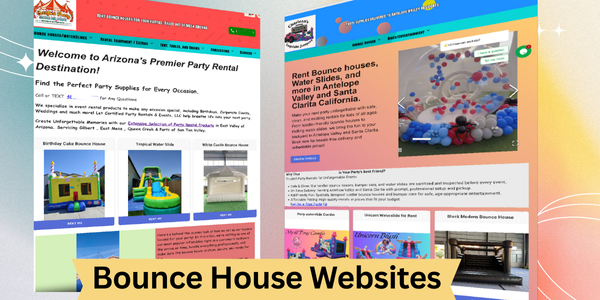
Successful inflatable sites share a pattern: clear photos, obvious prices, specs in a table, a video or two, and a booking path that doesn’t force a phone call. Use category cards on the homepage — Bounce Houses, Water Slides, Obstacle Courses, Combos — so visitors self-select instead of scrolling a wall of units.
What to write on your bounce house product pages
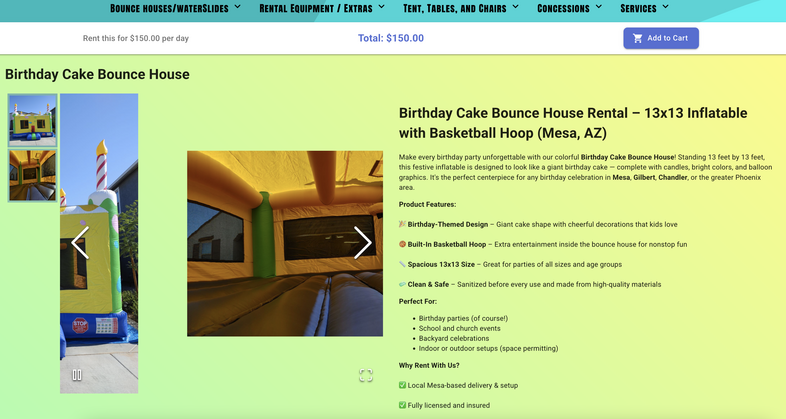
Aim for helpful, specific copy — not keyword stuffing. A strong product page usually covers:
- Who it’s for — ages, party type (birthday, school, church picnic)
- Space needed — footprint and overhead clearance
- What’s included — delivery radius, setup, blower, stakes/sandbags
- Rules — shoes off, weather policy, adult supervision
- Local proof — neighborhoods or cities you serve
Example opening line: “This 15×15 castle fits up to 8 kids ages 5–10 and needs a flat 20×20 area with a standard outlet nearby. Delivery and setup included within 25 miles of downtown.”
SEO tips tailored to inflatables
Target the phrases people actually type when hiring fun for a party. Primary terms to weave naturally into titles, H2s, and product copy:
Create one strong page per major product type, mention your city/region, and publish helpful articles (setup tips, size guides, weather policies). Update pages when you add new units — fresh inventory photos signal a living business to both customers and search engines. For a deeper SEO playbook, read SEO for bounce house rental websites.
Local modifiers matter. Pair product keywords with your service area: “bounce house rental in [city],” “water slide rental [county],” “inflatable rentals near [landmark].” Put that language in page titles and the first paragraph — not stuffed ten times. Google rewards pages that clearly answer who you serve and what you rent.
Content ideas that attract links and featured snippets: a backyard size checklist, a rain-day policy explained in plain English, a comparison of dry bounce vs. water slide for summer parties, and a “how many kids fit” chart. Each of those can live on your site as an article or as a section on a product page — and each can rank for long-tail searches your competitors ignore.
How to grow bookings after you launch
- Fill weekdays — offer a coupon for Monday–Thursday school events and church picnics.
- Upsell packages — castle + generator + delivery shown as one package raises average ticket.
- Retarget past customers — email last year’s birthday families in early spring with “same weekend still open?”
- Partner locally — party supply stores and photographers can refer traffic to your booking link.
- Photograph every job — with permission, add new gallery shots monthly so pages stay fresh.
Platform demo: how bounce house and inflatable operators run bookings on RentalSetup.
Pricing: Free to Start, Clear Upgrade Path
You can create your inflatable rental website and start listing products for free. When you’re ready to look more professional and take payments online, upgrade to full features for $25 per month — including a custom domain and credit card processing.
That’s less than one weekday booking for most fleets — and it replaces a stack of website + booking + payment tools.
FAQs About Inflatable Rental Websites
How long does it take to set up?
Most operators can publish a working site in a few hours: create an account, upload your top inflatables with photos and prices, and share the booking link. Polish product pages with the block editor whenever you have spare time between deliveries.
Can I import existing products?
Yes. Add the bounce houses, slides, and packages you already own. Reuse photos and descriptions from your old site, Facebook album, or printed catalog — then connect inventory and the calendar so availability stays accurate.
Is it good for multiple inflatables?
Absolutely. RentalSetup is designed for fleets. Track each unit, group them into categories, prevent overbooking, and manage every Saturday from one calendar — whether you have 3 castles or 30.
Do I need coding skills?
No. The website builder and block editor are point-and-click. If you can upload a photo and type a description, you can run the site.
Will this help me grow beyond Facebook posts?
Yes. A dedicated site with SEO-friendly product pages ranks for searches Facebook posts don’t. Combine that with online booking and you capture demand 24/7 — not only when you’re free to reply to DMs.
Be the inflatable supplier families find first — start your site free today.
Start Building FreeRentalSetup
The easiest way to build your rental business website. Get started for free.
Legal
Privacy Policy© 2026 RentalSetup. All rights reserved.