
🔍 See How Google Finds Your Party Rental Website
RentalSetup shows you the exact words people type into Google to find your bounce house and inflatable rental site — grouped by week so you can spot trends, catch drops early, and get more customers.
Updated:
Table of Contents
See How Google Finds Your Party Rental Site
You built a website for your bounce house or inflatable rental business — but do you know if Google is actually sending customers to it? And when someone does find you through Google, do you know what they searched for?
RentalSetup's built-in Google Search Console (GSC) integration answers those questions directly inside the platform. Without leaving your site, you can see which search queries brought visitors to each of your pages — grouped by the last 7, 14, and 25 days — along with how many clicks, impressions, and what position your page ranked.
✨ What This Feature Lets You Do:
- See the real words Google users type that lead to your pages
- Track query volume across three time windows (1–7, 8–14, 15–25 days)
- Spot when traffic is dropping before it disappears entirely
- Understand which text on your page is working — and what's missing
- Check if your page is indexed on Google at all
- Request Google to re-crawl your page after you make updates
⭐ Subscriber Feature: The Google Search Console integration is available on the $25/month RentalSetup plan, which also includes a custom domain, credit card payments, customer reviews, and a chat widget.
Ready to see how Google is finding your rental site?
Start Your $25/mo PlanWhat Are Search Queries?
A search query is the exact text a person types into Google when looking for something. When someone types "bounce house rental Houston" into Google, that phrase is a query. If your page appears in the results for that phrase — even if the person doesn't click — Google records it.
RentalSetup pulls those queries directly from Google Search Console and surfaces them next to each of your product pages and your homepage. You can see at a glance how many unique queries your page appeared for in recent days — and click to see each one.
Example: What real query data looks like for a bounce house rental page —
The Query Timeline Feature: 1–7, 8–14, and 15–25 Days
Instead of showing you one big number, RentalSetup breaks your queries into three time windows. This lets you see whether your query count is growing, holding steady, or declining — at a glance, right next to your product listing.
Live example of the GSC widget on a product page:
When you click on a number, a popup shows you each individual query — along with its clicks, impressions, and position. This makes it easy to see exactly which searches are trending up or falling off.
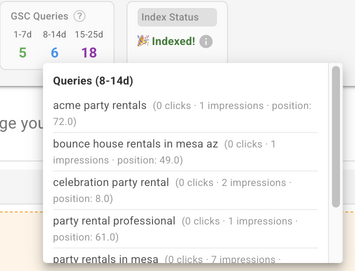
Clicks, Impressions & Position — What They Mean for Your Rental Business
Understanding these three numbers helps you make smarter decisions about your page content.
Clicks — Are people actually visiting your page?
If your page got 200 impressions but only 3 clicks, something about your listing in Google is not compelling enough. Try improving your page title and the first sentence of your description. Something like "Bounce House Rentals in [City] — Same-Day Delivery Available" is more click-worthy than a generic title.
Impressions — Is Google showing your page at all?
If impressions are very low (under 20 per week), your page is not appearing in many searches. This means either the text on your page doesn't match what people search for, or your page isn't indexed yet. Both are fixable — add more detail to your page and use the Request Indexing feature.
Position — Where do you rank?
Position 1–3 is the sweet spot — most clicks happen there. Positions 4–10 still get traffic. Positions 11+ (page 2 and beyond) get almost none. If you're at position 15 for "inflatable party rentals," you're almost invisible. Adding more content, local keywords, and related terms can help push you up over time.
💡 Quick Rule: High impressions + low clicks → fix your title/description. Low impressions → add more relevant content and make sure your page is indexed.
Real Use Cases for Bounce House & Inflatable Rental Businesses
Here's how a real party rental business can use this feature week to week:
🎪 Scenario 1: Your Bounce House Page Had 10 Queries Last Month, Now 2
You check your bounce house product page and notice the 1–7 day window shows 2 queries while the 15–25 day window showed 10. Traffic is dropping fast.
What to do: Click the 15–25 day number to see which queries were driving traffic. You notice "bounce house rental with slides" was bringing visitors. Your page doesn't mention slides much. Add a paragraph specifically describing your slide bouncer options, include nearby city names, and request re-indexing. This gives Google fresh content to evaluate.
🏰 Scenario 2: Discovering an Unexpected Query
You're reviewing your party package page and see a query: "moon bounce rental for school event." You never thought about marketing to schools! Your page appears for that query but ranks at position 18.
What to do: Add a section to your page specifically mentioning school events, field days, and end-of-year parties. Include the phrase "moon bounce rental" alongside your usual "bounce house" language. Request indexing and check back in 1–2 weeks to see if that position improves.
🎠 Scenario 3: Finding Out Your Obstacle Course Page Gets Zero Queries
You check your obstacle course inflatable page and all three time windows show 0. Nobody is finding it through Google at all.
What to do: First, use the Index Status tool to check if the page is even in Google's index. If it's not indexed, request indexing. Then look at your page content — does it mention "obstacle course inflatable rental"? Does it mention your city? A page with very little text is hard for Google to understand. Add a detailed description of the inflatable, who it's for, dimensions, and what events it works for.
🎉 Scenario 4: Noticing Seasonal Query Spikes
In April, your query count for "birthday party bounce house rental" spikes compared to January. You can see this by comparing the 1–7 day and 15–25 day numbers over a few weeks.
What to do: Use the seasonal increase as a signal to refresh your content before next spring. Update your page, add photos from recent spring events, and request indexing in February so Google has time to re-rank you before the rush hits.
Use Related Keywords to Capture More Searches
One of the most powerful things you can learn from your query data is that different people use different words for the same thing. If your page only uses the word "bounce house," you might be missing everyone who searches for any of these:
The fix is simple: naturally work these related terms into your page content. You don't need to stuff keywords awkwardly — just write naturally about the product and mention the different names people use.
Example — Before (too narrow):
"Rent our bounce house for your next party. Our bounce house is great for kids."
Example — After (captures more queries):
"Rent our bounce house — also called a bouncy house, inflatable, or moon bounce — for your next birthday party, school event, or community gathering. Our inflatables are safe for kids ages 3–12 and come in classic and combo slide styles. Looking for a jumper rental in [your city]? We deliver same day."
📘 Pro Tip: After you update your page with richer content and related keywords, use RentalSetup's Request Indexing feature to tell Google your page has changed. Without requesting indexing, Google might not come back to check for weeks or months.
What to Do When Queries Drop or Stay Low
A drop in queries is a signal, not a crisis — but you need to act before the drop becomes a disappearance. Here's a step-by-step response plan:
Is Your Page Even Indexed on Google?
Before you can appear in search results, Google has to know your page exists. This process is called indexing. A page that isn't indexed gets zero queries, zero clicks — nothing.
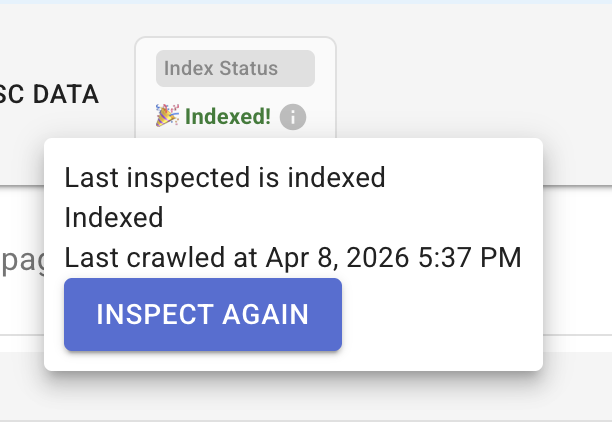
RentalSetup's Index Status widget sits right next to your GSC query data on each product page. It shows you one of three states:
The Index Status tool also shows a history of every time you checked or requested indexing — with timestamps. This helps you track how often Google has visited your page and whether your request was acknowledged.
Request Indexing After Updates — Don't Wait for Google to Come Back on Its Own
Here's something most rental business owners don't know: after you update a page on your website, Google may not come back to check it for weeks or even months. They have billions of pages to crawl and they prioritize sites that update frequently.
RentalSetup gives you a Request Indexing button on every product page and your homepage. After you make any meaningful update — adding content, fixing a description, adding photos — click it. You're essentially raising your hand to Google and saying: "Hey, I changed something. Please come look."
Without Requesting Indexing
- Google crawls your page on its own schedule
- Could be weeks or months before it notices updates
- Your ranking may not improve for a long time
- New queries won't appear until Google re-crawls
With Request Indexing
- You signal Google directly after each update
- Google often revisits the page within days
- Your changes are evaluated much sooner
- New queries can start appearing faster
⚡ Important: Requesting indexing doesn't guarantee a better rank — that depends on your content quality and competition. But it does mean Google evaluates your page sooner, so your improvements have a chance to be rewarded faster.
Tips for Getting More Queries on Your Rental Pages
Write more than a sentence or two
A bounce house product page that only says "Great for kids. Call to book." gives Google almost nothing to work with. Write 150–300 words per page: describe the inflatable, who it's for, what events work, dimensions, safety features, and your service area. The more relevant text you have, the more queries you can match.
Use the words your customers actually search
Look at your query data and take note of what real searchers type. If they're searching "water slide bounce house combo rental" and your page doesn't use those words, you'll never rank for it. Mirror the language of your actual queries in your content.
Include your city and nearby neighborhoods
Party rental is a local business. "Bounce house rental" is hard to rank for nationally, but "bounce house rental in [Your City]" or "inflatable rental [Neighborhood]" is much more achievable. Include your city name, surrounding areas, and any neighborhoods you serve.
Add context words around your main product
Inflatables are related to birthday parties, backyard events, church events, school carnivals, graduation parties, and summer cookouts. Mention these event types naturally. If someone searches "birthday party inflatable rental" and your page mentions birthday parties, you're more likely to match.
Use alternate names for your products
Don't just say "bounce house." Mention: bouncy house, moon bounce, moon bounce house, inflatable bouncer, jumper, bouncy castle, and inflatable rental. Each term has a different audience searching for it — cover them all naturally.
Update pages regularly and request indexing each time
Google rewards sites that keep content fresh. Even a small update — adding a new photo caption, fixing a sentence, adding a paragraph — signals activity. Combine that with a Request Indexing click and you stay top of mind for Google's crawler.
Don't ignore pages with zero queries
If a page consistently shows zero queries across all three windows, it's not working for SEO. First check indexing, then audit the content. Does it have enough text? Does it mention your city? Does it include the product type? Zero queries usually means Google doesn't understand what the page is about.
Watch: How to Use the SEO Query Feature in RentalSetup
See exactly where to find query data on your product pages, how to read the 1–7 / 8–14 / 15–25 day windows, and how to request indexing — all inside your RentalSetup dashboard.
[Replace VIDEO_ID above with your YouTube video ID]
Start Using SEO Insights to Grow Your Rental Business Today
Most party rental businesses have no idea how their website performs on Google. With RentalSetup's built-in Google Search Console integration, you get a clear window into exactly how customers are finding you — and exactly what to fix when they're not.
The query timeline (1–7, 8–14, 15–25 days) makes it easy to catch drops early. The Index Status tool confirms your pages are actually in Google. And the Request Indexing button makes sure your updates get seen by Google quickly instead of waiting months.
All of this is available on the $25/month RentalSetup plan — the same plan that includes your custom domain, credit card payments, customer reviews, and chat widget.
Ready to see which Google searches bring customers to your rental site?
Start for $25/monthCheck out our full documentation to see all the features available for your party rental website.
Visit our documentation page to explore all the features RentalSetup offers for your bounce house and inflatable rental business.
Follow us on Facebook for updates, tips, and new feature announcements.
RentalSetup
The easiest way to build your rental business website. Get started for free.
Legal
Privacy Policy© 2026 RentalSetup. All rights reserved.