
Inflatable Waterslide Rental Software & Website Builder for Your Business
Upload inflatable water slides, take daily bookings, and grow rentals for your company
Updated:
Table of Contents
If you own inflatable water slides and run a rental company, you need software and a website builder. This guide is for business owners who want to upload inventory, take bookings, and increase inflatable waterslide rentals for your business.
RentalSetup is inflatable waterslide rental software with a built-in website builder. You list each inflatable slide, set a daily price, let customers finish the reservation on your site, and see every reserved job in the backend.
Phone-only shops lose jobs after hours. A storefront that shows availability and takes the order is how owners get more inflatable waterslide rentals without adding staff.
What owners get
- A product page and booking form for each waterslide you upload
- Daily rentals, coupon codes, and a refundable deposit on the form
- A nightly setting so an overnight keep is still charged as one day
- Overbooking mitigation so a reserved slide is not booked twice
Upload a Waterslide So a Page Is Created for You with a Checkout Form
Create a product for each waterslide. Add photos, a description, and a daily price. A page is created for you with a checkout form so customers pick dates and send the reservation to your company — the same flow bounce house and tent owners already use on RentalSetup.
That is the website-builder part: you are not hiring a designer to code a catalog. You upload the slide, the page goes live, and the form is already there.
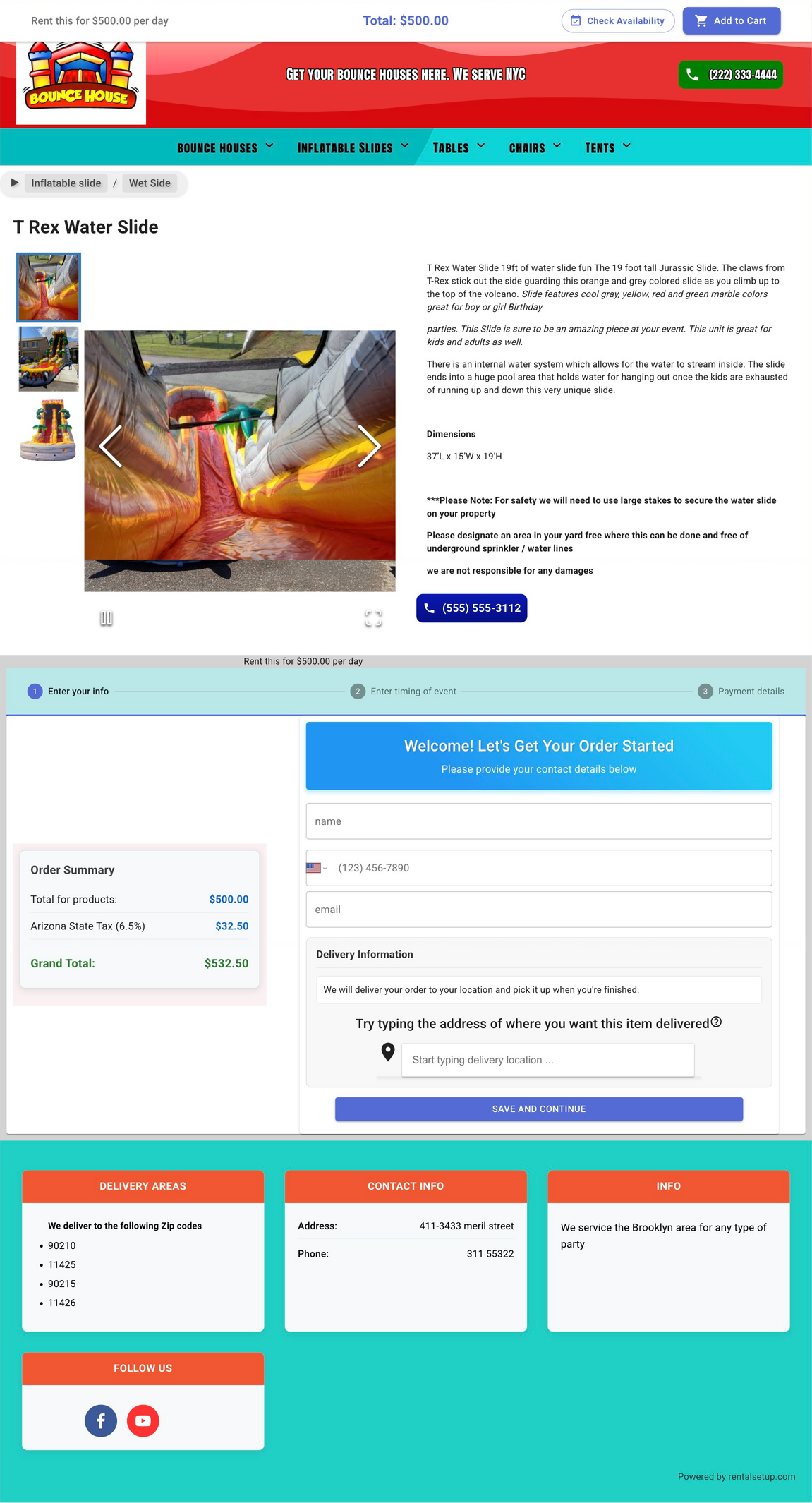
Waterslide product page with the booking form. Scroll the preview or click to enlarge.
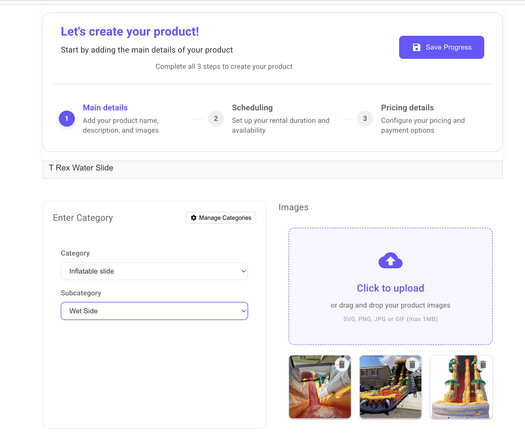
Start Process of Creating Your Inflatable Waterslide Rental Page
The first step is the create screen. Enter the name of the waterslide, upload images, and assign a category such as Waterslides. That category gives customers a page that lists only your waterslides, so they are not scrolling through tents and bounce houses to find a slide.
If you upload multiple images, the product page can show them in an animated slider so customers can flip through photos of the inflatable waterslide.
You can also write an SEO-friendly description with the text editor. The editor lets you create tables for features and dimensions, and change fonts and colors of the text. See the product page editor for a full walkthrough.
You can add or attach categories from this same step. A deeper walkthrough is in how to organize rental products with categories.
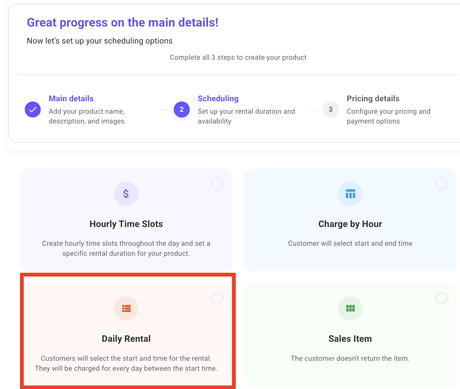
Rent Waterslides by the Day
On the next step, select Daily Rental for the inflatable waterslide. The customer chooses a start date and an end date and is charged for each day in that range. That is the scheduling style most inflatable waterslide rental businesses use when they list inventory online.
Daily rental is not the only option. You can also use hourly time slots — you set the slots and a fixed duration, and the customer picks one — or charge by the hour, where they choose a start and end time and pay for the hours in between. Those other pricing structures are useful if you rent a slide for a set block of hours instead of a full day. The product create page walks through each scheduling type.
Overbooking Mitigation
Once a waterslide is reserved, the next customer should not be able to take the same dates. RentalSetup has overbooking mitigation that checks inventory at checkout. Turn it on so a booked slide is blocked.
The check also looks at days you blocked out for holds. If you set a hold on a date — a tentative reservation, a day you are already committed, or a day you do not want to take another job — checkout treats that day as unavailable. You can set those holds in the guide on blocking dates and time buffers.
You can also set a leeway time before the job starts. That stops a customer from placing a booking within a few minutes of the job time, so you are not stuck with a last-minute order you cannot prepare for or deliver.
The full inventory walkthrough is in how to prevent double booking for party rentals.
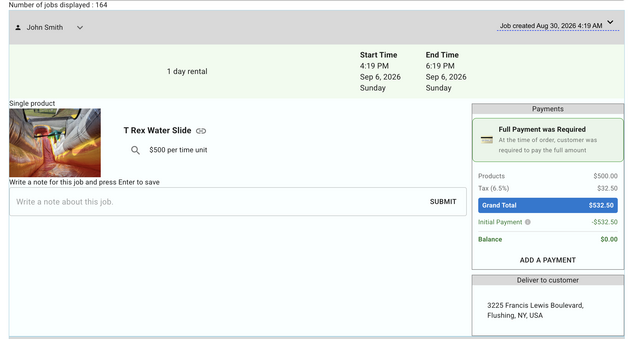
See a Reserved Waterslide in the Backend
After a customer submits the form, the job shows up in your backend. You see which waterslide is reserved, the dates, and the rest of the order — the same job list you use for bounce houses and tents.
On the jobs view page you can also refund a customer's credit card and charge additional amounts, such as tips.
Coupon Codes and Refundable Deposits
You can create coupon codes on the waterslide and rent it by the day. A code with a percentage off is useful for slow weeks, repeat customers, or a partner who sends you jobs.
On the same form, a customer can enter a refundable deposit. You collect it with the booking and return it when the waterslide comes back in good condition. That keeps the security deposit in the reservation instead of a separate invoice.
Keep the Waterslide Overnight — Charge One Day
Some customers need the slide overnight. You can turn on a nightly setting so that stay is still billed as one day. If they start at 5pm and end at 5pm the next day, the software counts one day instead of two. You control that per product. Without the setting, a daily rental charges every calendar day in the range.
Increase Waterslide Rentals for Your Business
Owners lose bookings when the only path is a phone call or a Facebook message. A storefront that lists every slide, shows open dates, and takes the deposit lets people finish the reservation without waiting for you to pick up.
For SEO, name the inflatable waterslide, its size, and the cities you serve in the description and title. Keep the page updated when photos or prices change. You can also run ads (Google or Facebook) and social posts that link straight to the product page, with a coupon when you want to fill a slow week. More on writing for search is in SEO for bounce house rental websites — the same approach works for inflatable slides.
Keep overbooking mitigation on so you never promise the same unit twice.
Frequently Asked Questions
How do I increase inflatable waterslide rentals for my business?
Put each slide on a page people can book, then help that page get found. For SEO, write a short description that names the inflatable waterslide, its size, and the cities or neighborhoods you deliver to, and use those same words in the page title. Update the page when you add photos or change the price so Google sees fresh content. You can also run Google or Facebook ads to the product URL, and share that same link in Instagram, Facebook, and Nextdoor posts so people land on checkout instead of your inbox. Coupons in those posts help fill slow dates.
Should each inflatable waterslide have its own page?
Yes. A 19-foot T-Rex slide and a dual-lane slip-n-slide are different products with different photos, sizes, and prices. Give each one a page, then put them in a Waterslides category so customers can browse the full set. One long page that mixes every unit is harder for people and for Google to match to a search.
I already rent bounce houses. Can I add inflatable waterslides on the same website?
Yes. Use one RentalSetup site and separate categories — Bounce Houses and Waterslides — so each catalog has its own page. Customers who only want a slide never have to scroll past jumpers. The same checkout, jobs list, and overbooking tools cover both.
Do I need a custom domain and card payments to start?
No. You can upload inflatable waterslides and take bookings on the free plan. Upgrade to Pro at $25/month when you want your own domain and credit card payments on the checkout form.
Where should I send ad and social traffic?
Send it to the product page for the slide you are promoting, or to the Waterslides category page if you want them to pick a unit. Those URLs already have the checkout form. A homepage or Facebook profile that only has a phone number makes people stop and message you instead of reserving.
Start Listing Your Waterslides
If you own waterslides, the next step is to put them on a site that takes daily bookings. Upload each unit, add the form, turn on coupons and a refundable deposit, and use overbooking mitigation so reserved dates stay reserved.
Upload your waterslides and take bookings
Free to start. Pro is $25/month when you want a custom domain and card payments.
Related Articles
RentalSetup
The easiest way to build your rental business website. Get started for free.
Legal
Privacy Policy© 2026 RentalSetup. All rights reserved.