
Refundable security deposit for a rental business
A rental business can collect a refundable security deposit at checkout and return it when the job is done. A boat rental company can add $60 on top of the rental. The customer pays that $60 with the booking. You refund the $60 after the boat comes back in good condition. The same fee works for a party rental, an equipment rental, or any other product on your site.
Add the security deposit on the product
Open the product in the admin. On the product edit page, find Additional Fees. The same section is on a multi-product page. Click Add Fee.
For the label, enter Refundable security deposit. For the amount, enter 60 for a $60 hold, or whatever amount you want held for that rental. Save the fee. Additional fees are available on a paid plan.
The fee is added to the rental total. Customers see it with the booking, so the security deposit stays on the reservation.
Collect the deposit at checkout
The fee is included in the job total before checkout calculates what to charge.
- Full payment. The customer pays the rental price and the $60 security deposit together. Use this when you want the extra deposit collected at checkout, then returned later.
- Percentage deposit. The customer pays that percentage of the rental plus the security deposit. A 50% deposit on a $200 rental with a $60 fee charges $130 now.
- Fixed checkout deposit. The customer pays the fixed amount you set in payment settings. The rest of the job, including the security deposit, stays on the balance.
Those three choices live in payment settings at checkout. Full payment is the setting that matches a boat rental which takes the rental price plus $60 up front.
Return the deposit when the job is done
When the rental comes back in good condition, refund the security deposit from the job. Go to the jobs list, click open menu on that row, then click Refund Payments.
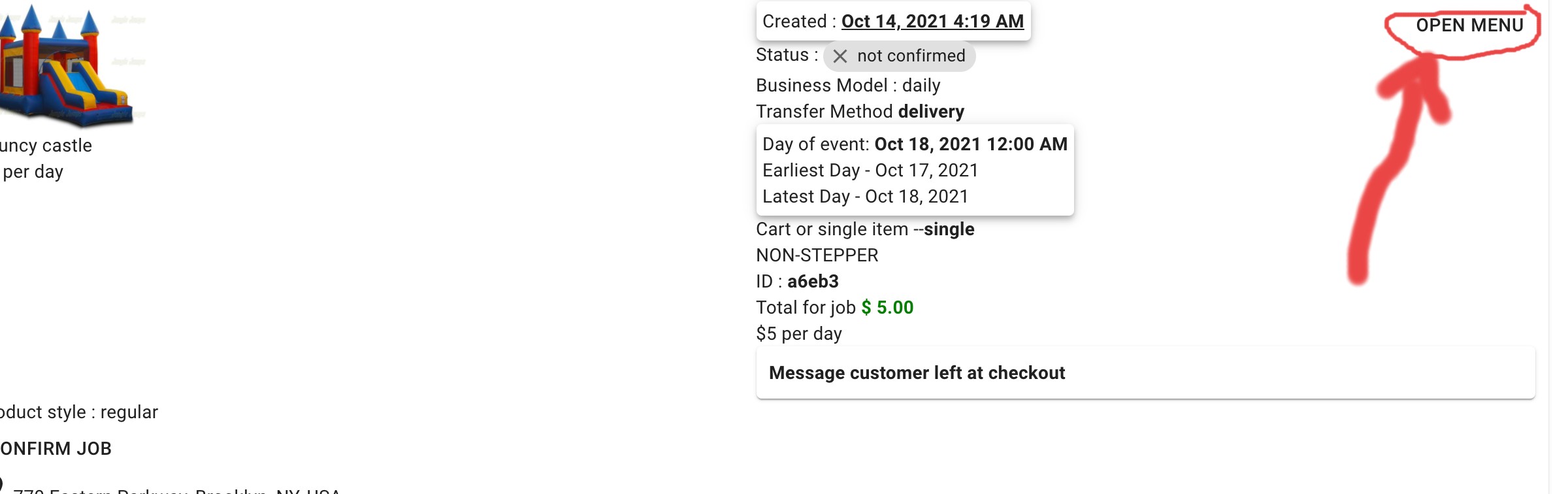

Select the charge and refund the $60. The balance on the job updates. Step-by-step screenshots are in making a refund for a job.

Checkout deposit and security deposit
A checkout deposit is a payment setting. It decides how much of the job the customer pays while booking: a percentage, a fixed portion, or the full amount.
A refundable security deposit is the additional fee. It is the extra amount, such as $60 for a boat, that you can return when the job is done. Use both together when you want the rental paid and the deposit held at checkout.
Questions rental owners ask
How does a rental business collect a refundable security deposit at checkout?
Open the product in your RentalSetup admin and add an additional fee. Label it Refundable security deposit and enter the amount, such as 60. The fee is added to the rental total. Set the product to charge the full amount at checkout so the customer pays the rental price and the security deposit together.
Can a boat rental company charge $60 extra and return it when the job is done?
Yes. Add a $60 additional fee named Refundable security deposit on the boat. With full payment at checkout, the customer pays the boat rental plus $60. When the job is done and the boat is back in good condition, open the job and refund that $60.
What is the difference between a checkout deposit and a refundable security deposit?
A checkout deposit is a payment setting. It charges a percentage of the job, a fixed portion of the job, or the full amount while the customer is booking. A refundable security deposit is an additional fee on the product, such as $60, that you collect with the rental and return when the job is done.
How do I refund a security deposit after the rental is returned?
Go to the jobs list, open the menu on that job, and choose Refund Payments. Select the charge for the security deposit and refund it. The job balance updates after the refund.
RentalSetup
The easiest way to build your rental business website. Get started for free.
Legal
Privacy Policy© 2026 RentalSetup. All rights reserved.