
How to Add a Category Section to Your Party Rental Website Homepage
If your rental business offers more than one type of equipment — bounce houses, tents, tables and chairs, waterslides — a category section on your homepage makes it easy for customers to find exactly what they're looking for. Instead of scrolling through a long product list, they can click a category card and jump straight to the products they want.
The category section is built using the block editor on your homepage. The output is a clean, visual section with cards that each show an image, a title, and a link to a category page. It also supports a section headline and supporting text above the cards, so you can write something like "Browse by rental type" to guide your customers.
What the Category Section Looks Like
Watch the short video below to see what the finished category section looks like on a rental website homepage, and where to go in the editor to create it.
Step 1: Open the Block Editor on Your Homepage
Go to the admin bar, which is available after you log in. Click Site Pages then Edit the Homepage. On the homepage editor, find the Block Editor block in your layout and open it. If you haven't added a Block Editor block yet, use the edit bar to add one first.
Step 2: Insert the Category Section
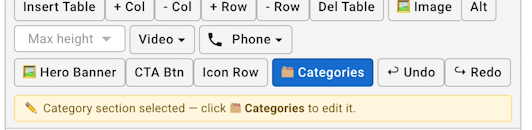
Inside the block editor, look for the Categories button in the toolbar. Click it to insert a category section at the current cursor position. A default section will appear with placeholder cards.
Step 3: Edit the Category Section
Unlike regular text, you can't click directly inside the category section to edit it. Instead, click anywhere on the category section to select it, then click the Categories button in the toolbar. This opens the full editor dialog where you can configure everything.
What You Can Set for the Section
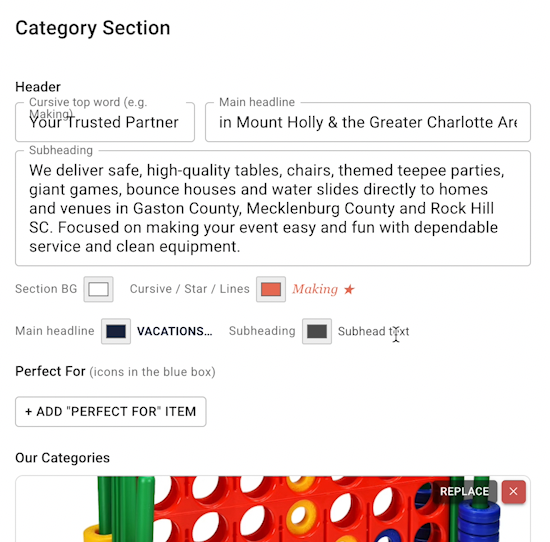
- Section headline: The main heading above the cards, for example "Browse Our Rentals"
- Accent phrase: A highlighted word or phrase that appears in a different color within the headline
- Subheading text: A short sentence below the headline describing what the section is for
- Section background color: The color behind all the cards
What You Can Set for Each Category Card
- Card title: The name of the category, like "Bounce Houses", "Tents", or "Waterslides"
- Background image: A photo that fills the card background — use a clear, recognizable photo of that rental type
- Card color / overlay: A color overlay on top of the image, which also controls how the title text stands out
- Link: The URL of the category page this card should go to when clicked. See the product categories guide for how to set up category pages.
You can add up to 5 cards. Each card is its own row in the dialog, so you fill out the fields for one card at a time.
About Category Pages
Each card in the category section links to a category page. A category page shows all the products that belong to that category. For customers, this means they can click "Waterslides" and see only waterslides — no bounce houses, no tents, just what they searched for.
To set up your categories and attach them to products, see the product categories page guide. That guide covers how to create categories, assign products to them, and add custom text to the category page itself.
RentalSetup
The easiest way to build your rental business website. Get started for free.
Legal
Privacy Policy© 2026 RentalSetup. All rights reserved.